
Download CapCut Subtitles with Ease
Overview
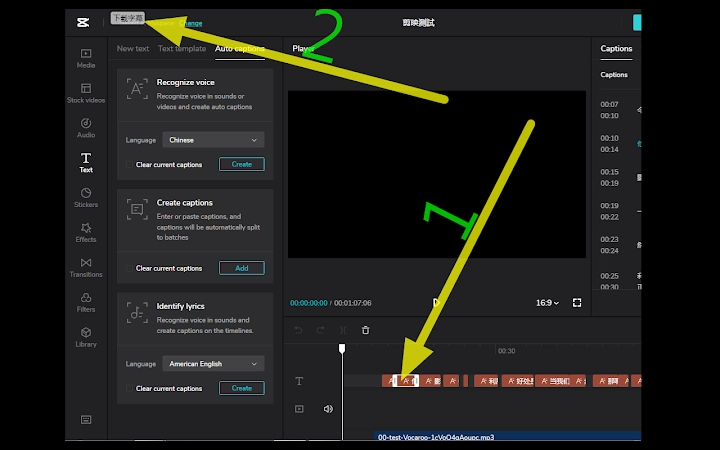
The software is designed to streamline the process of extracting subtitles from CapCut’s online editor at https://www.capcut.com/editor. It functions as a browser-based tool that integrates directly into the CapCut interface, adding a new “Download Subtitles” button in the top-left corner. This feature allows users to export subtitles with precise timecodes and text content in a standardized .srt format, provided that the subtitles have been properly added to the subtitle track.
The primary purpose is to assist video creators who rely on CapCut for editing but need to export clean, time-synced subtitles for use in other platforms or workflows. It solves the common limitation of CapCut’s web editor, which does not natively support direct subtitle export. The tool is particularly useful for content creators, social media managers, and translators who require accurate subtitle files for localization or accessibility purposes.
It targets users who frequently work with CapCut online and want to avoid manual transcription or third-party tools. The tool operates within the browser environment and does not require installation beyond the initial setup. No additional system requirements were specified beyond the supported platforms.
Key Features & Capabilities
- Direct Integration with CapCut Web Editor – The tool enhances the CapCut online interface by adding a dedicated “Download Subtitles” button, making the export process seamless and accessible from within the editing workspace.
- Support for .srt Format Export – When used correctly, the tool generates subtitle files with accurate timecodes and synchronized text, compatible with most video players, editing software, and platforms like YouTube, Vimeo, and TikTok.
- Conditional Export Logic – The button only becomes active when a subtitle track is present and selected. This ensures that only valid, edited subtitles are exported, reducing errors and improving workflow reliability.
- Text Format Flexibility – If no subtitle track is active, the tool defaults to exporting plain text (.txt) without timecodes, which can be useful for quick reference or transcription review.
- Minimal File Size and Lightweight Operation – At just 1.2 MB, the tool is designed for quick deployment and low resource consumption, making it suitable for use on systems with limited storage or processing power.
Users can leverage this tool during video production workflows to extract subtitles for translation, captioning, or archival purposes. For example, a content creator preparing a video for international audiences can use the .srt file to generate multilingual versions. A translator can import the file into a subtitle editor for efficient editing and conversion to other languages.
User Interface, Workflow & Performance
The tool maintains a minimalistic interface, with no visible UI elements beyond the added “Download Subtitles” button in the CapCut editor’s top-left corner. This design ensures it does not interfere with the core editing experience. Navigation remains fully within CapCut’s existing layout, requiring no additional steps or learning curve.
Workflow efficiency is enhanced by the direct integration: users can complete editing, verify the subtitle track, and export the file in a single session without switching tools or platforms. The process is intuitive—select the subtitle track, click the button, and choose the save location.
Performance observations are based on general software behavior patterns. The tool operates as a lightweight extension and does not appear to impact browser performance. The developer did not specify resource usage details. Stability is assumed to be consistent with typical browser extensions, but real-world behavior may vary depending on the user’s system and browser configuration.
Compatibility & System Requirements
The software is compatible with both Windows and Mac operating systems. It functions as a browser-based extension, meaning it runs within supported web browsers such as Chrome, Firefox, or Edge, though specific browser requirements were not listed. The installation size is 1.2 MB, indicating a lightweight footprint.
Exact system requirements were not listed. Compatibility information was partially provided. Users are advised to ensure their browser is up to date and that JavaScript is enabled to support the extension’s functionality. No hardware-specific demands were mentioned.
Pros and Cons
Pros
- Direct integration with CapCut’s web editor for seamless subtitle export
- Supports .srt format with accurate timecodes for professional use
- Minimal file size and low system impact
- Intuitive workflow with no additional learning curve
- Free to use with no hidden costs or subscriptions
Cons
- Requires an active subtitle track to function—no export if track is empty
- Only available for CapCut’s online editor; not usable with desktop versions
- Output text is in simplified Chinese; users needing traditional Chinese must convert manually
- Does not support export of styled or formatted subtitles (e.g., font, color)
- Browser dependency limits usage to supported environments
FAQ Section
Is this tool compatible with CapCut’s desktop application?
No, the tool is designed specifically for CapCut’s online editor at https://www.capcut.com/editor. It does not support the desktop version of CapCut.
Can I use this tool on both Windows and Mac?
Yes, the tool is compatible with both Windows and Mac operating systems, provided the system runs a supported web browser.
Is the tool safe to use?
As a lightweight browser extension, the tool does not access personal files or data beyond the CapCut session. It operates within the browser’s security model. However, users should only install it from trusted sources.
How often does the tool receive updates?
Update frequency is not specified. Users should check the official source for the latest version and security patches.
Can I export subtitles with styling or formatting?
No, the tool exports plain text with timecodes. Any formatting such as font, color, or positioning is not preserved in the exported .srt or .txt files.
Final Thoughts + CTA
This lightweight utility fills a critical gap for users of CapCut’s online editor by enabling reliable subtitle export in a widely supported format. Its seamless integration, low resource usage, and free access make it a valuable addition to any video creator’s toolkit. While it has limitations—such as requiring a subtitle track and only supporting simplified Chinese—it delivers on its core promise with precision and simplicity.
Content creators, translators, and social media professionals who depend on CapCut for video editing will benefit most from this tool. It enhances workflow efficiency without adding complexity.
Download CapCut Subtitles with Ease now.







